

Trading
Trading is how you build and refine your squad for tournaments. Use it to back players you think will perform, rotate based on form and fixtures, and position for better leaderboard finishes.
TL;DR
Buy shares to add players to your squad
Sell shares to rebalance and regain Gold
Fees apply on buys and sells
Swaps can reduce total fees when rotating from one player to another
Timing matters around tournament snapshots
Where to trade
Transfers page
The Transfers page shows the player market and helps you discover:
Trending players
Top movers (largest price movement in the last 24H)
Any player’s price and recent movement
Player page
The player page is where you:
buy shares
sell shares (if you hold shares)
swap into or out of the player
review performance and market context
Fees
Buy fee: 3%
Sell fee: 3%
Swap fee: 3% on the sell side, and 2% on the buy side, so a sell + buy via swap is 5% total
Tip - If you are rotating from Player A into Player B, swap is usually cheaper than selling then buying separately.
Trading during tournaments
Some tournaments use a snapshot system (see Trading During Tournaments). Buying after the snapshot may not count for that tournament cycle.
Common mistakes
Ignoring fees when sizing trades
Making trades without checking tournament snapshot timing
Overreacting to one match instead of the full tournament window
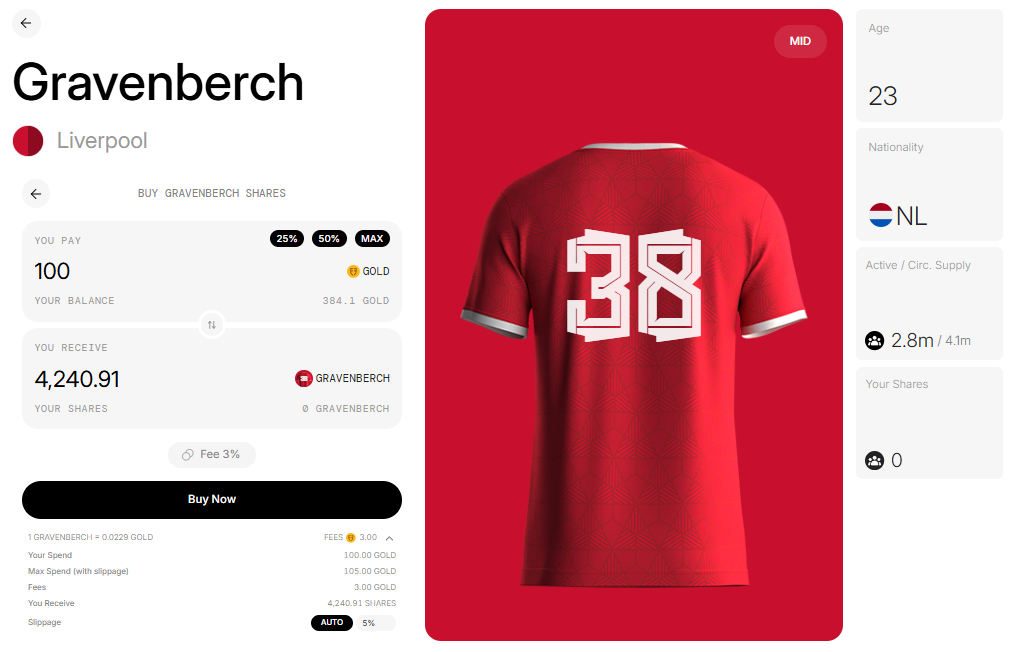
Buying Your First Shares
Go to the Transfer Page
Browse through all available players. You can use the filters or search bar to find someone specific.
Choose a Player
Click on the player you’re interested in. This will open their profile page, where you’ll see:
Buy / Sell options
Price
Age and Country
Active Supply / Circulating Supply
Active Supply = shares currently eligible in active squads
Circulating = the total of all shares held by players and in the marketplace
Your current shares
Upcoming matches
Past performance, tournament history, and price trends
(We’ll keep adding more player stats and features over time.)
Click Buy or Sell
Press the Buy or Sell button to open the trading window.
Enter Your Purchase/Sell Details
When Buying, you can choose to:
Spend a set amount of Gold
Or buy a set number of shares (use the switch icon to toggle between the two).
When Selling, you can only choose:
Sell a set number of shares.
Below the Buy/Sell Now button, you’ll see a dropdown with information on:
Fees
Slippage (set to 5% by default, but you can adjust it manually)
You can read about the slippage on this page - The Currencies
Confirm Your Trade
Click Buy Now or Sell Now, wait for the transaction to complete, and that’s it. Done, your squad is updated.